faqs
We're Here to Answer All of Your Questions!
Is there additional information about KUB Fiber's service or a manual that I can print out at home?
What does KUB Fiber being a not-for-profit mean?
Do I have access to any authenticated applications through my KUB TV solution?
What should KUB Fiber customers know about bandwidth?
Read five reasons why customers should upgrade to KUB Fiber here.
What should KUB Fiber customers know about latency?
Read five reasons why customers should upgrade to KUB Fiber here.
How does your internet solution compare to other providers?
We offer an internet solution that includes 1 gigabit (1,000 mbps) symmetrical upload and download speeds for $65 a month to residential customers. Research has shown that these performance levels are currently unavailable for most customers in our electric service area for that price and will allow customers to operate more devices more reliably.
Television, phone, and managed WiFi products are also available to residential customers. Phone and managed WFi products are available to business customers.
Read more about how fiber internet compares to other internet offerings here.
Check out four reasons locals are upgrading to KUB Fiber here.
What is expected with KUB Fiber' 1 Gig speed solution?
The Gig, 1 gbps, is equivalent to 1,000 mbps. Internet speeds indicate the maximum capability of the wired network service to the home, based on the recommended setup. Actual wireless speeds vary depending on WiFi 6 compatible devices. See HomePass question for more details about checking your speeds.
What does a KUB Fiber installation look like and how long does it take?
• A technician will come out 2-4 days before your installation appointment to complete the prep work of connecting the fiber from the pole to the box outside of your house. It is not required that you are home for this however, if they must enter a gate to reach the box, they will knock on your door to inform you.
• Your in-home installation appointment is set for a specific time and is scheduled for 4 hours but may not take the entire time. The average install takes 2 hours.
• Someone over the age of 18 must be present for the entire installation.
• Check out our In-Home Installation Process here.
Read more about the KUB Fiber buildout and installation process here.
Is there any additional charge for connection or installation of KUB Fiber?
KUB does not expect there to be any costs associated with running fiber to a customer's home or the installation process itself.
Will the fiber system be installed overhead or underground?
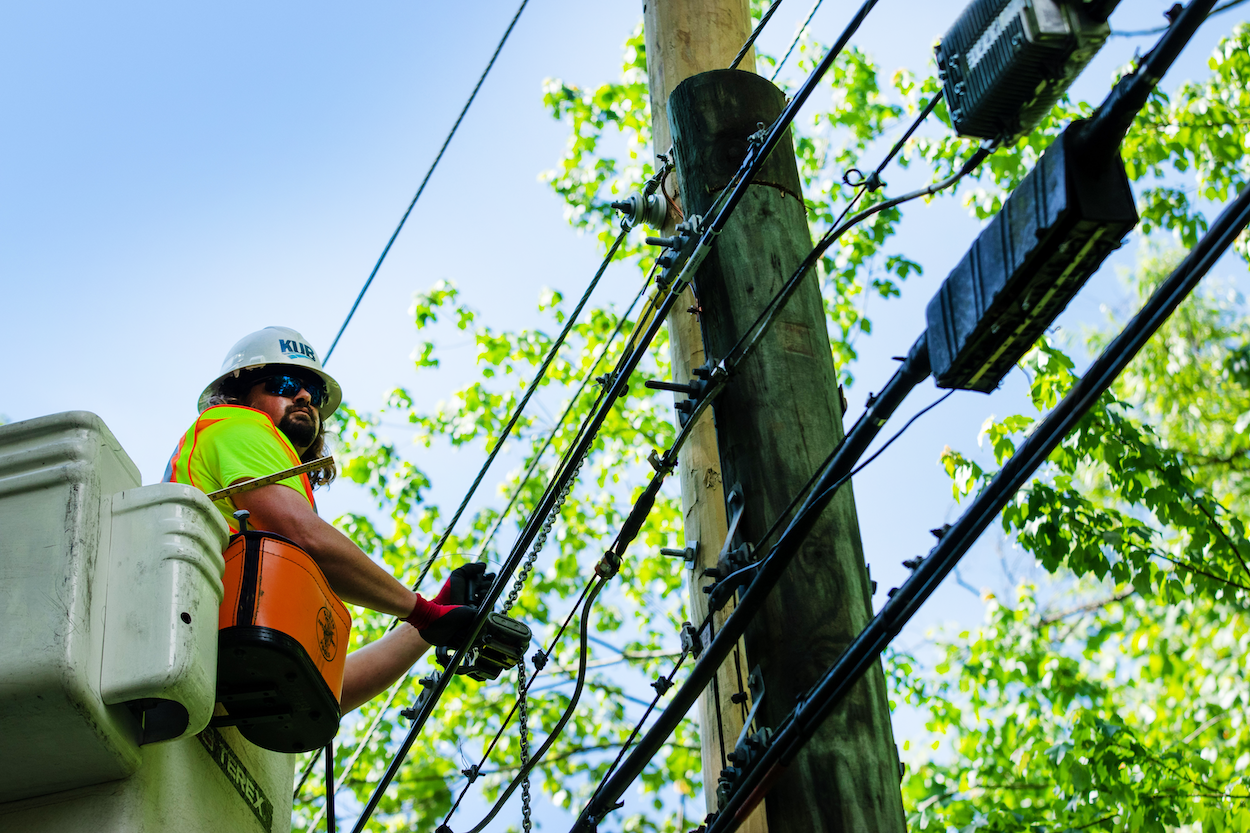
KUB plans to install its fiber optic cables wherever the electric wires are installed. This means that, in most cases, when the electric lines are underground, the fiber will be underground, and where the lines are overhead, the fiber will be overhead.
Read more about the KUB Fiber buildout and installation process here.
Do I need to purchase a new modem or router?
Customers will not need a modem to receive our fiber internet services. We will provide a RJ45 Ethernet connection.
However, customers have options when it comes to wireless routers. Customers can provide their own router; we recommend a WiFi 6 router. Recommendations on routers by intended usage can be found here. KUB also offers Smart Gig Managed WiFi service for an additional $15 per month. This includes a compatible wireless router, the HomePass app, and additional technical support.
Read more about KUB's Smart Gig Managed WiFi service here
What is Smart Gig Managed WiFi for residential customers?
Smart Gig Managed WiFi solution provides enhanced technical support to the customer for $15/month. By choosing to subscribe, we will provide customers with a compatible WiFi-enabling router and equipment throughout the home. Subscribers will have access to the HomePass app portal to view their wireless network at a device level. With this solution we have removed the burden of self-home network management and will make sure that you get regular router upgrades so your network can perform optimally.
Learn more about KUB Smart Gig Managed WiFi service here.
What is the Plume Home app and what does it provide customers?
The Plume Home application allows customers to have more control over their wireless service down to the device level. The app provides password and access controls, content and parental controls, network and device monitoring, and speed testing. Plume Home allows for simple and easy management of your wireless network.
The Plume Home application is available to KUB Smart Gig Managed WiFi subscribers. Read more here.
Will fiber fees be on a separate bill from my other KUB utilities?
We will provide a separate bill for our Fiber internet solutions. KUB believes it can be useful for customers to manage their internet costs separately. It will also ensure that nonpayment for fiber solutions will not impact other solutions provided by KUB and vice versa.
Have additional questions about your bill?
Click here to learn more about your KUB Fiber bill.
Does KUB offer any bill assistance on their fiber bill?
Qualifying KUB customers may be eligible for a monthly internet discount towards their internet solution through our ConnectED program. For more information on ConnectED and how to qualify, click here.
If I have an email from a previous service provider, will I have to get a new email address to get KUB Fiber?
KUB Fiber customers can use any email to start an account. Switching providers won’t impact your current email address, as email addresses and internet service are independent.
Where will the tech support and call center be located and how do I contact them?
KUB has dedicated local technical and customer support staff to ensure that our customers' issues are fully understood when they arise.
For technical support contact 865-524-2911, 24/7/365 and follow the prompts for technical support.
For customer support contact 865-524-2911, 7am-9pm Monday - Saturday, and follow the prompts for fiber, then for residential or for business.
Quarterly Maintenance Notifications Information
KUB’s Fiber Operations staff perform planned maintenance on fiber-related systems four times each year to ensure our Internet, TV, and Phone products are operating reliably for our customers. We make every effort to minimize service interruptions by consolidating all service-affecting work into the hours of 2 a.m. to 5 a.m. For more information visit https://tst.kub.org/fiber-maintenance.
The schedule for the 2026 planned maintenance periods can be seen below.
• August 13, 2026 starting at 2:00 a.m.
• November 12, 2026 starting at 2:00 a.m.
Is there a charge for technical support visits if I have an issue with my internet service?
Smart Gig Managed WiFi customers have free technical support through this additional service. Anytime that a KUB technician needs to come to your home to add devices or troubleshoot in person, it will be free of charge.
<Learn more about KUB Smart Gig Managed WiFi service here.
Do customers have to pay for WiFi extenders or are those included with the service?
KUB Fiber does not include WiFi extenders for the standard internet solution. However, Smart Gig Managed WiFi includes a WiFi extender if needed to support your household.
Can other KUB Fiber solutions, TV and Phone, be added on at any time?
Yes! The only stipulation with our TV and Phone solutions is that customers also have active KUB Fiber internet service. TV and Phone can be added on whenever customers wish to.
What is the difference between fiber internet compared to coaxial?
Fiber optic cables themselves are small, flexible strands of glass. They utilize light to transmit significant amounts of data. Coaxial, on the other hand, transmits data through electricity, at a much slower rate.
Fiber cables offer advantages in speed, reliability, latency and scalability compared to coaxial. KUB Fiber runs along our existing electric network as well, eventually offering the solution to anyone that has access to KUB Electric.
I am in a serviceable or soon to be serviceable area but live in an apartment, condo, or multi-dwelling unit. How do I go about getting KUB Fiber internet into my complex?
Since MDUs can be more complex to install fiber infrastructure, you may need the cooperation of your landlord or property owner. Encourage them to contact KUB to discuss the possibility of getting KUB Fiber installed.
If you are a tenant and interested in KUB Fiber click below:
If you are a property owner and interested in connecting KUB Fiber to your properties click below:
In what instance would a KUB customer not be eligible for KUB Fiber?
KUB Fiber is actively expanding its network within our existing KUB Electric territory. This means that once the buildout is complete, only households with KUB Electric will have access to KUB Fiber.
What is Smart Gig at Work Managed WiFi?
Taking care of your network is a task that pulls your IT team away from the core of your business, pulling their focus onto troubleshooting instead of innovating. With Smart Gig at Work Managed WiFi solution, you get access to experts who can ease this burden on your staff. Specialists can take over the time-consuming process of managing reliable and secure network connectivity for your employees and customers.
Are there additional solutions offered to businesses?
KUB Fiber provides various internet solution options for businesses as well as business phone solutions tailored to meet each business's unique needs.
Learn more about the different business solutions here.
What is the difference between hosted phone and landline phone for business?
Hosted Phone gives business customers the ability to not worry about their phone system. We provide all the phones, set up, and maintenance. This product goes above and beyond a typical phone line with direct dial extensions, auto attendants, conference calls, and more. Landlines do not offer as many features.
What is symmetrical upload and download speed?
Symmetrical speeds mean your upload speed is the same as your download speed. Unlike other providers, where the upload speed is often lower than the download speed, symmetrical speeds offer equal performance for both.
Does KUB offer a static IP address, how do I get a static IP address, and what does it cost?
Yes, KUB Fiber will make static IP addresses available for residential and business customers. There will be a monthly fee associated with this. Please contact our call center at 865-524-2911 if you would like to order one.
For more information on static IP's visit our Static IP FAQs
How does KUB TV work?
KUB TV can be accessed by downloading the KUB TV application on most connected devices. No additional equipment is required for smart televisions or televisions connected to Amazon Fire TV Stick or similar hardware. KUB TV is compatible with the following Fire TV Stick models: Voice Remote, Alexa Remote (2nd generation), and Fire TV Stick 4K.
KUB TV is not compatible with Fire TV Stick 4K Select, Vizio Smart TVs, Roku Smart TVs, or Roku streaming devices.
The packages have been designed with KUB customers in-mind and resemble traditional cable channel combinations. Explore our channel solutions here.
Does KUB Fiber streaming TV include access to TV Everywhere?
TV Everywhere gives you access to network channels while outside your home. If you've used your provider's credentials to sign in to a TV network's app, you've used TV Everywhere. For information on how to use TV Everywhere with KUB TV, click here.
Read more about Out-of-Home streaming options here.
How do I know what TV package is right for me?
KUB offers a MyBundle quiz that helps you decide on the streaming bundle that is right for you based on the channels and shows you watch the most. That quiz can be accessed here.
What is KUB TV Multiview?
Multiview allows viewers to watch multiple live streams simultaneously. Users can watch up to four live broadcasts at once, on a single screen. There are additional personalized viewing options that allow users to customize their screen layout even more.
Is KUB Residential Phone a typical landline?
Yes. KUB has standard home phone lines that offer unlimited long-distance calls, voicemail, call waiting, caller ID, call rejection, call forwarding, and more. This service can be easily added to your Fiber internet during checkout or at anytime after.
Is there additional information about KUB Fiber's service or a manual that I can print out at home?
What does KUB Fiber being a not-for-profit mean?
Do I have access to any authenticated applications through my KUB TV solution?
What should KUB Fiber customers know about bandwidth?
Read five reasons why customers should upgrade to KUB Fiber here.
What should KUB Fiber customers know about latency?
Read five reasons why customers should upgrade to KUB Fiber here.
How does your internet solution compare to other providers?
We offer an internet solution that includes 1 gigabit (1,000 mbps) symmetrical upload and download speeds for $65 a month to residential customers. Research has shown that these performance levels are currently unavailable for most customers in our electric service area for that price and will allow customers to operate more devices more reliably.
Television, phone, and managed WiFi products are also available to residential customers. Phone and managed WFi products are available to business customers.
Read more about how fiber internet compares to other internet offerings here.
Check out four reasons locals are upgrading to KUB Fiber here.
What is expected with KUB Fiber' 1 Gig speed solution?
The Gig, 1 gbps, is equivalent to 1,000 mbps. Internet speeds indicate the maximum capability of the wired network service to the home, based on the recommended setup. Actual wireless speeds vary depending on WiFi 6 compatible devices. See HomePass question for more details about checking your speeds.
What does a KUB Fiber installation look like and how long does it take?
• A technician will come out 2-4 days before your installation appointment to complete the prep work of connecting the fiber from the pole to the box outside of your house. It is not required that you are home for this however, if they must enter a gate to reach the box, they will knock on your door to inform you.
• Your in-home installation appointment is set for a specific time and is scheduled for 4 hours but may not take the entire time. The average install takes 2 hours.
• Someone over the age of 18 must be present for the entire installation.
• Check out our In-Home Installation Process here.
Read more about the KUB Fiber buildout and installation process here.
Is there any additional charge for connection or installation of KUB Fiber?
KUB does not expect there to be any costs associated with running fiber to a customer's home or the installation process itself.
Will the fiber system be installed overhead or underground?
KUB plans to install its fiber optic cables wherever the electric wires are installed. This means that, in most cases, when the electric lines are underground, the fiber will be underground, and where the lines are overhead, the fiber will be overhead.
Read more about the KUB Fiber buildout and installation process here.
Do I need to purchase a new modem or router?
Customers will not need a modem to receive our fiber internet services. We will provide a RJ45 Ethernet connection.
However, customers have options when it comes to wireless routers. Customers can provide their own router; we recommend a WiFi 6 router. Recommendations on routers by intended usage can be found here. KUB also offers Smart Gig Managed WiFi service for an additional $15 per month. This includes a compatible wireless router, the HomePass app, and additional technical support.
Read more about KUB's Smart Gig Managed WiFi service here
What is Smart Gig Managed WiFi for residential customers?
Smart Gig Managed WiFi solution provides enhanced technical support to the customer for $15/month. By choosing to subscribe, we will provide customers with a compatible WiFi-enabling router and equipment throughout the home. Subscribers will have access to the HomePass app portal to view their wireless network at a device level. With this solution we have removed the burden of self-home network management and will make sure that you get regular router upgrades so your network can perform optimally.
Learn more about KUB Smart Gig Managed WiFi service here.
What is the Plume Home app and what does it provide customers?
The Plume Home application allows customers to have more control over their wireless service down to the device level. The app provides password and access controls, content and parental controls, network and device monitoring, and speed testing. Plume Home allows for simple and easy management of your wireless network.
The Plume Home application is available to KUB Smart Gig Managed WiFi subscribers. Read more here.
Will fiber fees be on a separate bill from my other KUB utilities?
We will provide a separate bill for our Fiber internet solutions. KUB believes it can be useful for customers to manage their internet costs separately. It will also ensure that nonpayment for fiber solutions will not impact other solutions provided by KUB and vice versa.
Have additional questions about your bill?
Click here to learn more about your KUB Fiber bill.
Does KUB offer any bill assistance on their fiber bill?
Qualifying KUB customers may be eligible for a monthly internet discount towards their internet solution through our ConnectED program. For more information on ConnectED and how to qualify, click here.
If I have an email from a previous service provider, will I have to get a new email address to get KUB Fiber?
KUB Fiber customers can use any email to start an account. Switching providers won’t impact your current email address, as email addresses and internet service are independent.
Where will the tech support and call center be located and how do I contact them?
KUB has dedicated local technical and customer support staff to ensure that our customers' issues are fully understood when they arise.
For technical support contact 865-524-2911, 24/7/365 and follow the prompts for technical support.
For customer support contact 865-524-2911, 7am-9pm Monday - Saturday, and follow the prompts for fiber, then for residential or for business.
Quarterly Maintenance Notifications Information
KUB’s Fiber Operations staff perform planned maintenance on fiber-related systems four times each year to ensure our Internet, TV, and Phone products are operating reliably for our customers. We make every effort to minimize service interruptions by consolidating all service-affecting work into the hours of 2 a.m. to 5 a.m. For more information visit https://tst.kub.org/fiber-maintenance.
The schedule for the 2026 planned maintenance periods can be seen below.
• August 13, 2026 starting at 2:00 a.m.
• November 12, 2026 starting at 2:00 a.m.
Is there a charge for technical support visits if I have an issue with my internet service?
Smart Gig Managed WiFi customers have free technical support through this additional service. Anytime that a KUB technician needs to come to your home to add devices or troubleshoot in person, it will be free of charge.
<Learn more about KUB Smart Gig Managed WiFi service here.
Do customers have to pay for WiFi extenders or are those included with the service?
KUB Fiber does not include WiFi extenders for the standard internet solution. However, Smart Gig Managed WiFi includes a WiFi extender if needed to support your household.
Can other KUB Fiber solutions, TV and Phone, be added on at any time?
Yes! The only stipulation with our TV and Phone solutions is that customers also have active KUB Fiber internet service. TV and Phone can be added on whenever customers wish to.
What is the difference between fiber internet compared to coaxial?
Fiber optic cables themselves are small, flexible strands of glass. They utilize light to transmit significant amounts of data. Coaxial, on the other hand, transmits data through electricity, at a much slower rate.
Fiber cables offer advantages in speed, reliability, latency and scalability compared to coaxial. KUB Fiber runs along our existing electric network as well, eventually offering the solution to anyone that has access to KUB Electric.
I am in a serviceable or soon to be serviceable area but live in an apartment, condo, or multi-dwelling unit. How do I go about getting KUB Fiber internet into my complex?
Since MDUs can be more complex to install fiber infrastructure, you may need the cooperation of your landlord or property owner. Encourage them to contact KUB to discuss the possibility of getting KUB Fiber installed.
If you are a tenant and interested in KUB Fiber click below:
If you are a property owner and interested in connecting KUB Fiber to your properties click below:
In what instance would a KUB customer not be eligible for KUB Fiber?
KUB Fiber is actively expanding its network within our existing KUB Electric territory. This means that once the buildout is complete, only households with KUB Electric will have access to KUB Fiber.
What is Smart Gig at Work Managed WiFi?
Taking care of your network is a task that pulls your IT team away from the core of your business, pulling their focus onto troubleshooting instead of innovating. With Smart Gig at Work Managed WiFi solution, you get access to experts who can ease this burden on your staff. Specialists can take over the time-consuming process of managing reliable and secure network connectivity for your employees and customers.
Are there additional solutions offered to businesses?
KUB Fiber provides various internet solution options for businesses as well as business phone solutions tailored to meet each business's unique needs.
Learn more about the different business solutions here.
What is the difference between hosted phone and landline phone for business?
Hosted Phone gives business customers the ability to not worry about their phone system. We provide all the phones, set up, and maintenance. This product goes above and beyond a typical phone line with direct dial extensions, auto attendants, conference calls, and more. Landlines do not offer as many features.
What is symmetrical upload and download speed?
Symmetrical speeds mean your upload speed is the same as your download speed. Unlike other providers, where the upload speed is often lower than the download speed, symmetrical speeds offer equal performance for both.
Does KUB offer a static IP address, how do I get a static IP address, and what does it cost?
Yes, KUB Fiber will make static IP addresses available for residential and business customers. There will be a monthly fee associated with this. Please contact our call center at 865-524-2911 if you would like to order one.
For more information on static IP's visit our Static IP FAQs
How does KUB TV work?
KUB TV can be accessed by downloading the KUB TV application on most connected devices. No additional equipment is required for smart televisions or televisions connected to Amazon Fire TV Stick or similar hardware. KUB TV is compatible with the following Fire TV Stick models: Voice Remote, Alexa Remote (2nd generation), and Fire TV Stick 4K.
KUB TV is not compatible with Fire TV Stick 4K Select, Vizio Smart TVs, Roku Smart TVs, or Roku streaming devices.
The packages have been designed with KUB customers in-mind and resemble traditional cable channel combinations. Explore our channel solutions here.
Does KUB Fiber streaming TV include access to TV Everywhere?
TV Everywhere gives you access to network channels while outside your home. If you've used your provider's credentials to sign in to a TV network's app, you've used TV Everywhere. For information on how to use TV Everywhere with KUB TV, click here.
Read more about Out-of-Home streaming options here.
How do I know what TV package is right for me?
KUB offers a MyBundle quiz that helps you decide on the streaming bundle that is right for you based on the channels and shows you watch the most. That quiz can be accessed here.
What is KUB TV Multiview?
Multiview allows viewers to watch multiple live streams simultaneously. Users can watch up to four live broadcasts at once, on a single screen. There are additional personalized viewing options that allow users to customize their screen layout even more.
Is KUB Residential Phone a typical landline?
Yes. KUB has standard home phone lines that offer unlimited long-distance calls, voicemail, call waiting, caller ID, call rejection, call forwarding, and more. This service can be easily added to your Fiber internet during checkout or at anytime after.
Is there additional information about KUB Fiber's service or a manual that I can print out at home?
What does KUB Fiber being a not-for-profit mean?
Do I have access to any authenticated applications through my KUB TV solution?
What should KUB Fiber customers know about bandwidth?
Read five reasons why customers should upgrade to KUB Fiber here.
What should KUB Fiber customers know about latency?
Read five reasons why customers should upgrade to KUB Fiber here.
How does your internet solution compare to other providers?
We offer an internet solution that includes 1 gigabit (1,000 mbps) symmetrical upload and download speeds for $65 a month to residential customers. Research has shown that these performance levels are currently unavailable for most customers in our electric service area for that price and will allow customers to operate more devices more reliably.
Television, phone, and managed WiFi products are also available to residential customers. Phone and managed WFi products are available to business customers.
Read more about how fiber internet compares to other internet offerings here.
Check out four reasons locals are upgrading to KUB Fiber here.
What is expected with KUB Fiber' 1 Gig speed solution?
The Gig, 1 gbps, is equivalent to 1,000 mbps. Internet speeds indicate the maximum capability of the wired network service to the home, based on the recommended setup. Actual wireless speeds vary depending on WiFi 6 compatible devices. See HomePass question for more details about checking your speeds.
What does a KUB Fiber installation look like and how long does it take?
• A technician will come out 2-4 days before your installation appointment to complete the prep work of connecting the fiber from the pole to the box outside of your house. It is not required that you are home for this however, if they must enter a gate to reach the box, they will knock on your door to inform you.
• Your in-home installation appointment is set for a specific time and is scheduled for 4 hours but may not take the entire time. The average install takes 2 hours.
• Someone over the age of 18 must be present for the entire installation.
• Check out our In-Home Installation Process here.
Read more about the KUB Fiber buildout and installation process here.
Is there any additional charge for connection or installation of KUB Fiber?
KUB does not expect there to be any costs associated with running fiber to a customer's home or the installation process itself.
Will the fiber system be installed overhead or underground?
KUB plans to install its fiber optic cables wherever the electric wires are installed. This means that, in most cases, when the electric lines are underground, the fiber will be underground, and where the lines are overhead, the fiber will be overhead.
Read more about the KUB Fiber buildout and installation process here.
Do I need to purchase a new modem or router?
Customers will not need a modem to receive our fiber internet services. We will provide a RJ45 Ethernet connection.
However, customers have options when it comes to wireless routers. Customers can provide their own router; we recommend a WiFi 6 router. Recommendations on routers by intended usage can be found here. KUB also offers Smart Gig Managed WiFi service for an additional $15 per month. This includes a compatible wireless router, the HomePass app, and additional technical support.
Read more about KUB's Smart Gig Managed WiFi service here
What is Smart Gig Managed WiFi for residential customers?
Smart Gig Managed WiFi solution provides enhanced technical support to the customer for $15/month. By choosing to subscribe, we will provide customers with a compatible WiFi-enabling router and equipment throughout the home. Subscribers will have access to the HomePass app portal to view their wireless network at a device level. With this solution we have removed the burden of self-home network management and will make sure that you get regular router upgrades so your network can perform optimally.
Learn more about KUB Smart Gig Managed WiFi service here.
What is the Plume Home app and what does it provide customers?
The Plume Home application allows customers to have more control over their wireless service down to the device level. The app provides password and access controls, content and parental controls, network and device monitoring, and speed testing. Plume Home allows for simple and easy management of your wireless network.
The Plume Home application is available to KUB Smart Gig Managed WiFi subscribers. Read more here.
Will fiber fees be on a separate bill from my other KUB utilities?
We will provide a separate bill for our Fiber internet solutions. KUB believes it can be useful for customers to manage their internet costs separately. It will also ensure that nonpayment for fiber solutions will not impact other solutions provided by KUB and vice versa.
Have additional questions about your bill?
Click here to learn more about your KUB Fiber bill.
Does KUB offer any bill assistance on their fiber bill?
Qualifying KUB customers may be eligible for a monthly internet discount towards their internet solution through our ConnectED program. For more information on ConnectED and how to qualify, click here.
If I have an email from a previous service provider, will I have to get a new email address to get KUB Fiber?
KUB Fiber customers can use any email to start an account. Switching providers won’t impact your current email address, as email addresses and internet service are independent.
Where will the tech support and call center be located and how do I contact them?
KUB has dedicated local technical and customer support staff to ensure that our customers' issues are fully understood when they arise.
For technical support contact 865-524-2911, 24/7/365 and follow the prompts for technical support.
For customer support contact 865-524-2911, 7am-9pm Monday - Saturday, and follow the prompts for fiber, then for residential or for business.
Quarterly Maintenance Notifications Information
KUB’s Fiber Operations staff perform planned maintenance on fiber-related systems four times each year to ensure our Internet, TV, and Phone products are operating reliably for our customers. We make every effort to minimize service interruptions by consolidating all service-affecting work into the hours of 2 a.m. to 5 a.m. For more information visit https://tst.kub.org/fiber-maintenance.
The schedule for the 2026 planned maintenance periods can be seen below.
• August 13, 2026 starting at 2:00 a.m.
• November 12, 2026 starting at 2:00 a.m.
Is there a charge for technical support visits if I have an issue with my internet service?
Smart Gig Managed WiFi customers have free technical support through this additional service. Anytime that a KUB technician needs to come to your home to add devices or troubleshoot in person, it will be free of charge.
<Learn more about KUB Smart Gig Managed WiFi service here.
Do customers have to pay for WiFi extenders or are those included with the service?
KUB Fiber does not include WiFi extenders for the standard internet solution. However, Smart Gig Managed WiFi includes a WiFi extender if needed to support your household.
Can other KUB Fiber solutions, TV and Phone, be added on at any time?
Yes! The only stipulation with our TV and Phone solutions is that customers also have active KUB Fiber internet service. TV and Phone can be added on whenever customers wish to.
What is the difference between fiber internet compared to coaxial?
Fiber optic cables themselves are small, flexible strands of glass. They utilize light to transmit significant amounts of data. Coaxial, on the other hand, transmits data through electricity, at a much slower rate.
Fiber cables offer advantages in speed, reliability, latency and scalability compared to coaxial. KUB Fiber runs along our existing electric network as well, eventually offering the solution to anyone that has access to KUB Electric.
I am in a serviceable or soon to be serviceable area but live in an apartment, condo, or multi-dwelling unit. How do I go about getting KUB Fiber internet into my complex?
Since MDUs can be more complex to install fiber infrastructure, you may need the cooperation of your landlord or property owner. Encourage them to contact KUB to discuss the possibility of getting KUB Fiber installed.
If you are a tenant and interested in KUB Fiber click below:
If you are a property owner and interested in connecting KUB Fiber to your properties click below:
In what instance would a KUB customer not be eligible for KUB Fiber?
KUB Fiber is actively expanding its network within our existing KUB Electric territory. This means that once the buildout is complete, only households with KUB Electric will have access to KUB Fiber.
What is Smart Gig at Work Managed WiFi?
Taking care of your network is a task that pulls your IT team away from the core of your business, pulling their focus onto troubleshooting instead of innovating. With Smart Gig at Work Managed WiFi solution, you get access to experts who can ease this burden on your staff. Specialists can take over the time-consuming process of managing reliable and secure network connectivity for your employees and customers.
Are there additional solutions offered to businesses?
KUB Fiber provides various internet solution options for businesses as well as business phone solutions tailored to meet each business's unique needs.
Learn more about the different business solutions here.
What is the difference between hosted phone and landline phone for business?
Hosted Phone gives business customers the ability to not worry about their phone system. We provide all the phones, set up, and maintenance. This product goes above and beyond a typical phone line with direct dial extensions, auto attendants, conference calls, and more. Landlines do not offer as many features.
What is symmetrical upload and download speed?
Symmetrical speeds mean your upload speed is the same as your download speed. Unlike other providers, where the upload speed is often lower than the download speed, symmetrical speeds offer equal performance for both.
Does KUB offer a static IP address, how do I get a static IP address, and what does it cost?
Yes, KUB Fiber will make static IP addresses available for residential and business customers. There will be a monthly fee associated with this. Please contact our call center at 865-524-2911 if you would like to order one.
For more information on static IP's visit our Static IP FAQs
How does KUB TV work?
KUB TV can be accessed by downloading the KUB TV application on most connected devices. No additional equipment is required for smart televisions or televisions connected to Amazon Fire TV Stick or similar hardware. KUB TV is compatible with the following Fire TV Stick models: Voice Remote, Alexa Remote (2nd generation), and Fire TV Stick 4K.
KUB TV is not compatible with Fire TV Stick 4K Select, Vizio Smart TVs, Roku Smart TVs, or Roku streaming devices.
The packages have been designed with KUB customers in-mind and resemble traditional cable channel combinations. Explore our channel solutions here.
Does KUB Fiber streaming TV include access to TV Everywhere?
TV Everywhere gives you access to network channels while outside your home. If you've used your provider's credentials to sign in to a TV network's app, you've used TV Everywhere. For information on how to use TV Everywhere with KUB TV, click here.
Read more about Out-of-Home streaming options here.
How do I know what TV package is right for me?
KUB offers a MyBundle quiz that helps you decide on the streaming bundle that is right for you based on the channels and shows you watch the most. That quiz can be accessed here.
What is KUB TV Multiview?
Multiview allows viewers to watch multiple live streams simultaneously. Users can watch up to four live broadcasts at once, on a single screen. There are additional personalized viewing options that allow users to customize their screen layout even more.
Is KUB Residential Phone a typical landline?
Yes. KUB has standard home phone lines that offer unlimited long-distance calls, voicemail, call waiting, caller ID, call rejection, call forwarding, and more. This service can be easily added to your Fiber internet during checkout or at anytime after.